<?xml version="1.0" encoding="UTF-8"?>
<feed xmlns="http://www.w3.org/2005/Atom" xml:lang="en">
<title>Fresh off the NAS</title>
<subtitle>What’s new in NAS Wildcard.</subtitle>
<id>https://naswildcard.com/updates/</id>
<link href="https://naswildcard.com/updates/"/>
<link href="https://naswildcard.com/updates/atom.xml" rel="self" type="application/atom+xml"/>
<updated>2026-11-03T00:00:00.000Z</updated>
<author><name>NAS Wildcard</name></author>
<entry>
<title>NAS Wildcard 1.0 is on the App Store</title>
<id>https://naswildcard.com/updates/2026-11-03-nas-wildcard-1-0-is-on-the-app-store/</id>
<link href="https://naswildcard.com/updates/2026-11-03-nas-wildcard-1-0-is-on-the-app-store/"/>
<updated>2026-11-03T00:00:00.000Z</updated>

<content type="html"><![CDATA[<p>NAS Wildcard is out of TestFlight and on the App Store for iPhone and iPad.</p>
<p><a href="https://apps.apple.com/app/nas-wildcard/id6818480195"><strong>Get NAS Wildcard on the App Store</strong></a></p>
<p><img alt="launch-1.0" loading="lazy" decoding="async" width="2688" height="1448" src="https://naswildcard.com/_astro/1149-launch-1-0.53jr3phN_Z1R5a7.webp"></p>
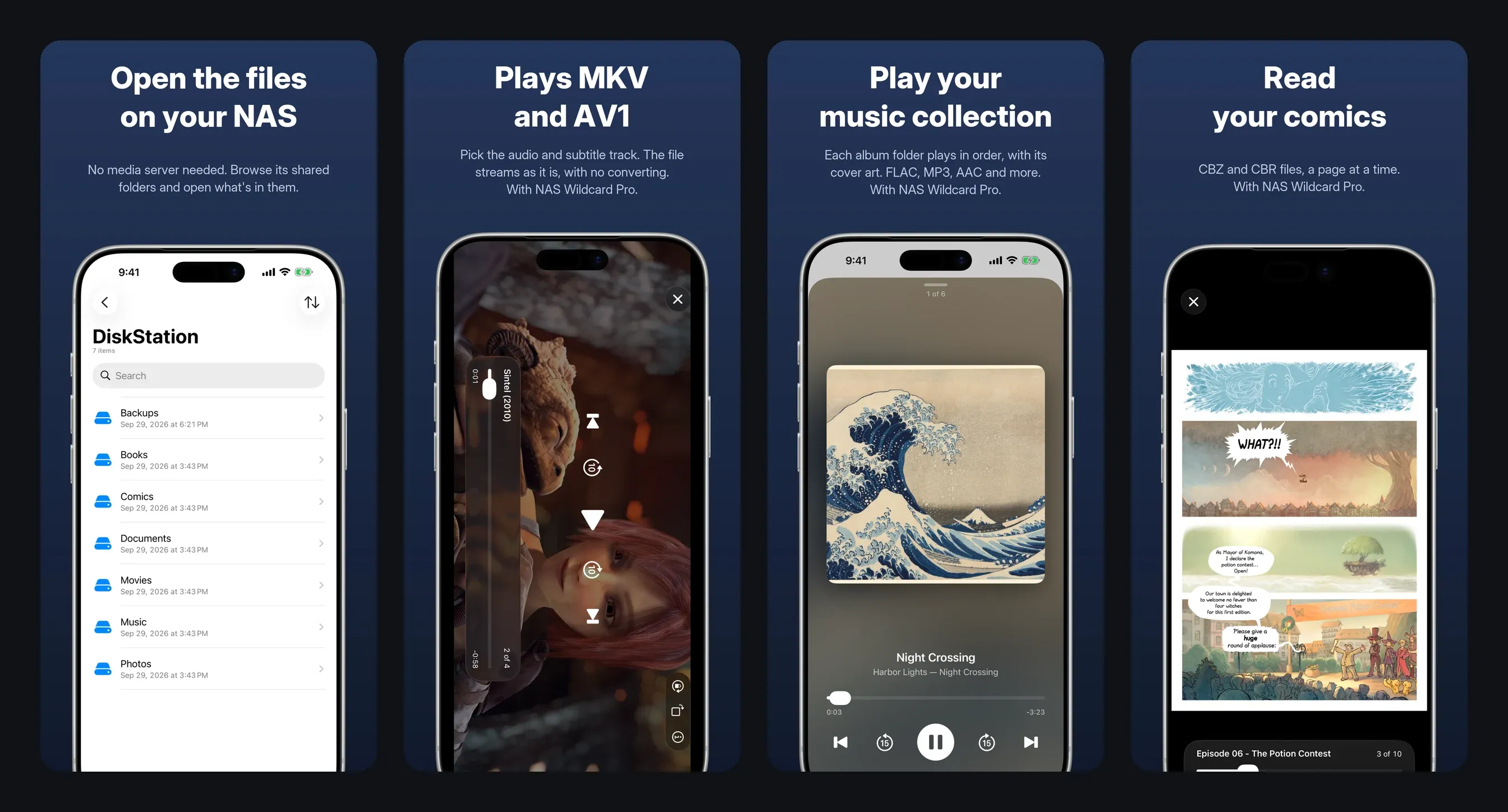
<p>It opens the files on your Synology, SMB or WebDAV NAS right where they are: videos, music, audiobooks, photos, comics, books, PDFs and text. You don’t install anything on the NAS, and there’s no media server or library to scan.</p>
<h2 id="free-and-pro">Free and Pro</h2>
<p>The app is free to download. Free covers one NAS on your home network, with video and music in the formats iOS plays itself, photos, text, favorites, search and Continue.</p>
<p><strong>NAS Wildcard Pro</strong> is one in-app purchase, not a subscription. It adds every format VLC plays (MKV, AVI, WebM, ripped DVD and Blu-ray folders and more), background audio for music and audiobooks, the comic, book and PDF readers, browsing inside archives, offline files, access from away from home, more than one NAS, and your NAS as a location in the Files app.</p>
<h2 id="thank-you-testers">Thank you, testers</h2>
<p>Every TestFlight build since the first one was shaped by your feedback. Thank you for all the screenshots, crash reports and notes.</p>
]]></content>
</entry>
<entry>
<title>Build 17: swipe to scrub videos, and the comic page grid opens at your page</title>
<id>https://naswildcard.com/updates/2026-10-07-build-17-swipe-to-scrub-videos-and-the-comic-page-grid-opens-at-your-page/</id>
<link href="https://naswildcard.com/updates/2026-10-07-build-17-swipe-to-scrub-videos-and-the-comic-page-grid-opens-at-your-page/"/>
<updated>2026-10-07T00:00:00.000Z</updated>
<category term="Reading"/>
<category term="Video"/>
<content type="html"><![CDATA[<h2 id="swipe-anywhere-to-scrub">Swipe anywhere to scrub</h2>
<p>Swipe sideways anywhere on a video to move through the whole thing in one go. A big frame preview sits in the middle of the screen with the time and the chapter, so you can find a scene without aiming for the slider. Drag back to where you started to cancel.</p>
<p><img alt="a12-swipe-to-scrub" loading="lazy" decoding="async" width="1311" height="603" src="https://naswildcard.com/_astro/984-a12-swipe-to-scrub.DDdYiT5Y_1eg9Ye.webp"></p>
<h2 id="comics">Comics</h2>
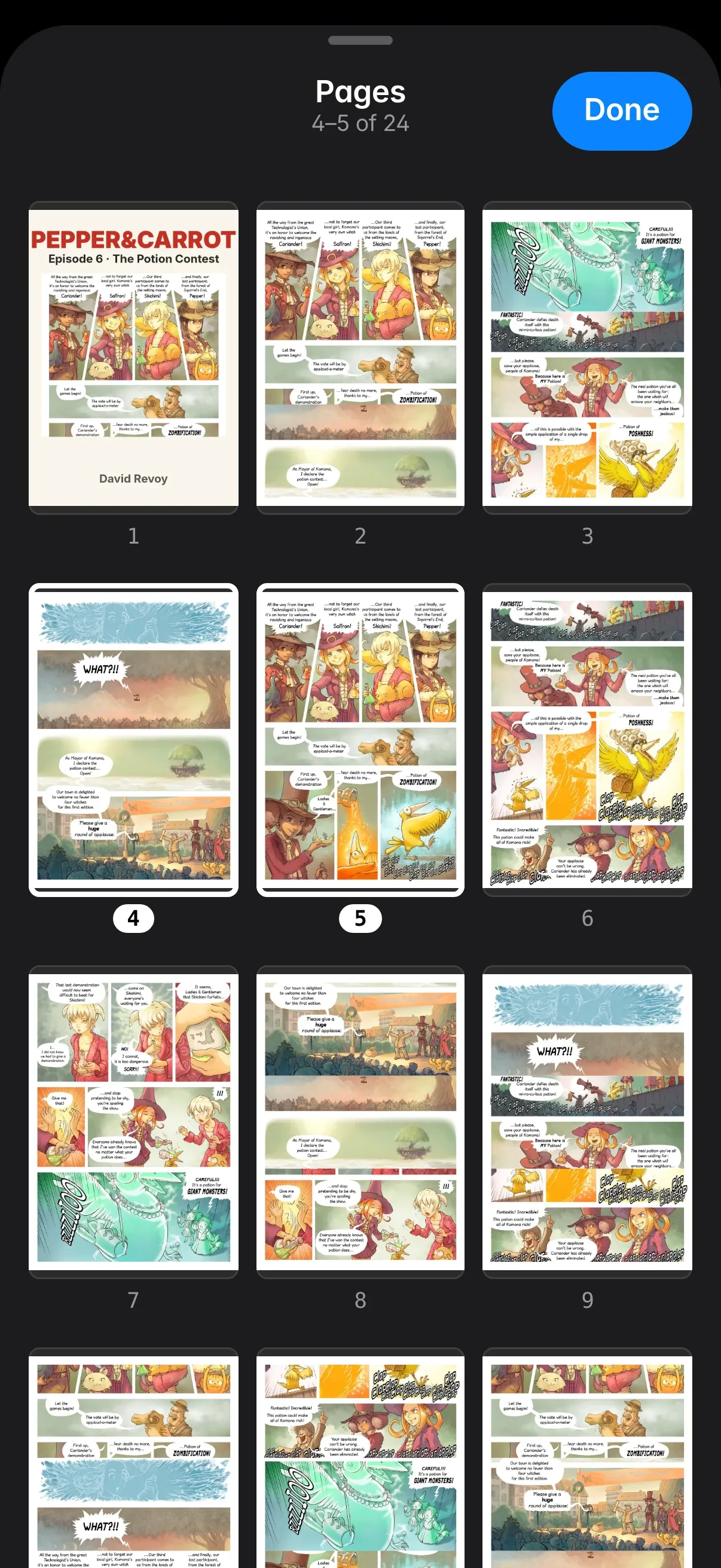
<p>The comic page grid opens at the page you’re on, not at page one.</p>
]]></content>
</entry>
<entry>
<title>Build 16: thumbnails everywhere, and archives inside archives</title>
<id>https://naswildcard.com/updates/2026-10-07-build-16-thumbnails-everywhere-and-archives-inside-archives/</id>
<link href="https://naswildcard.com/updates/2026-10-07-build-16-thumbnails-everywhere-and-archives-inside-archives/"/>
<updated>2026-10-07T00:00:00.000Z</updated>
<category term="New formats"/>
<content type="html"><![CDATA[<h2 id="thumbnails-on-every-server">Thumbnails on every server</h2>
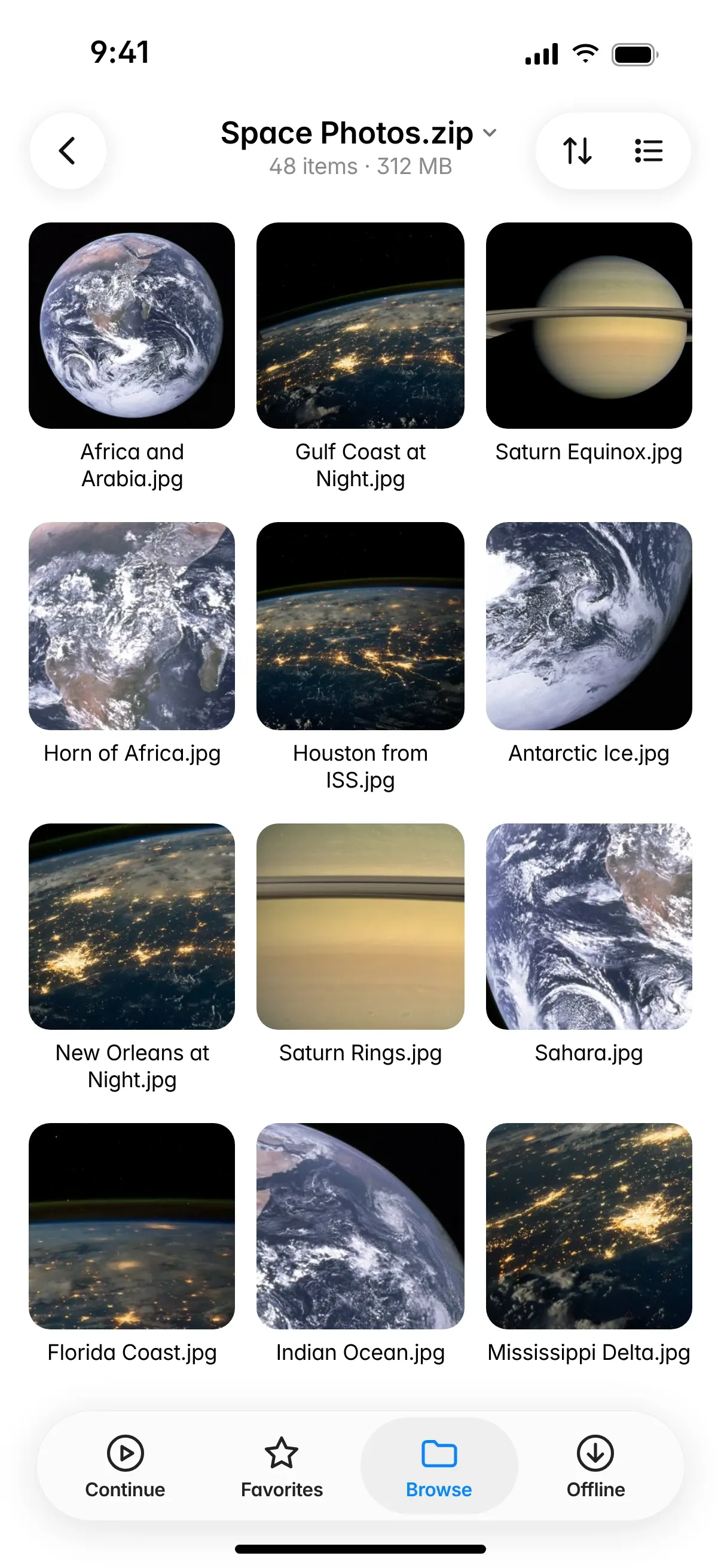
<p>Photos get thumbnails on SMB and WebDAV too, and inside archives, compressed files and disk images. Where the NAS doesn’t draw one, the app makes it on your phone, so a zip of scans or a share on your TrueNAS box shows pictures instead of a wall of icons.</p>
<p><img alt="10-thumbnails-in-zip" loading="lazy" decoding="async" width="1206" height="2622" src="https://naswildcard.com/_astro/982-10-thumbnails-in-zip.C2cyQcGp_Z1kM8VQ.webp"></p>
<h2 id="archives-inside-archives">Archives inside archives</h2>
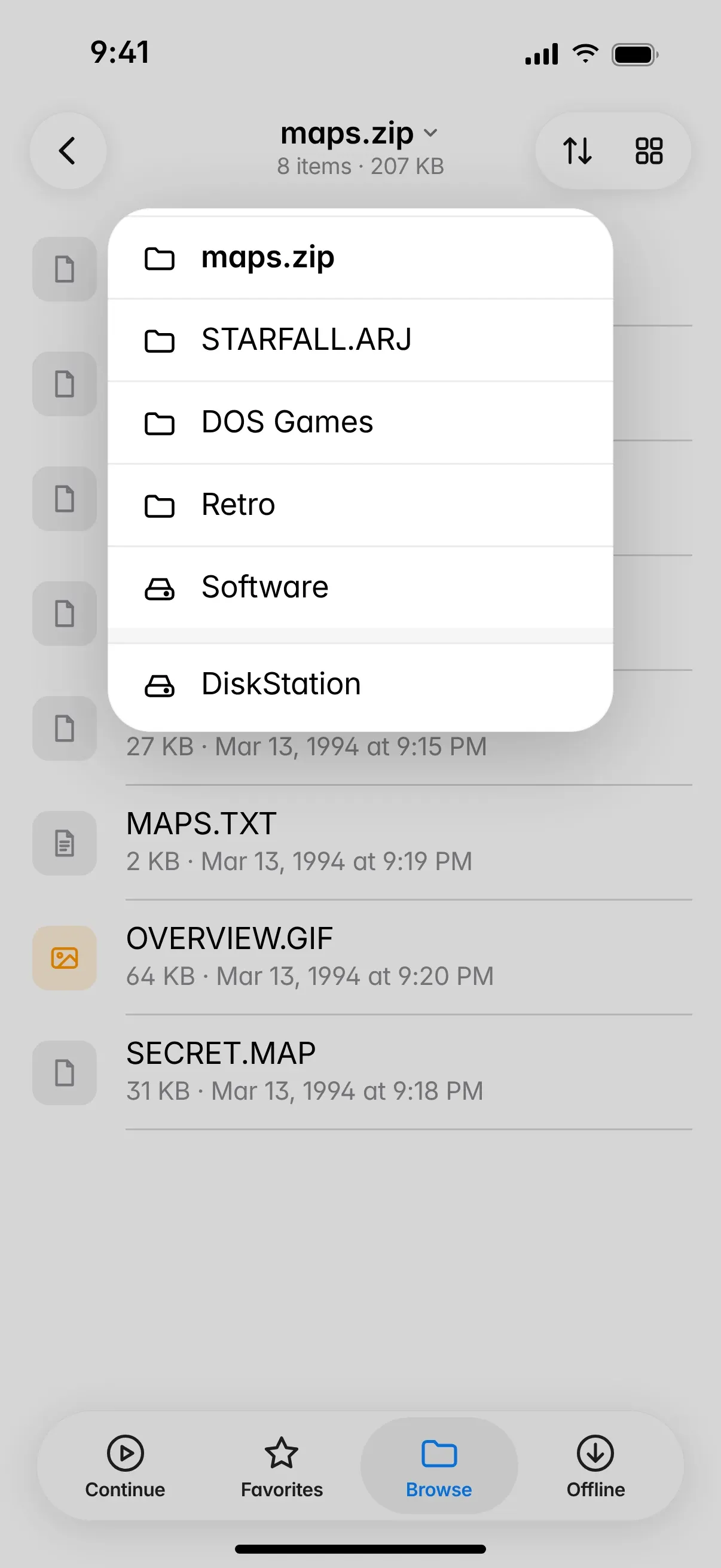
<p>A zip inside an ARJ, a <code>.tar.xz</code> inside a <code>.deb</code>: tap it and it browses like any other folder, read straight out of the archive it’s in. Nothing to extract first, and nothing written to your NAS.</p>
<p><img alt="11-archive-in-archive" loading="lazy" decoding="async" width="1206" height="2622" src="https://naswildcard.com/_astro/983-11-archive-in-archive.k9ETpjUv_xC5S8.webp"></p>
]]></content>
</entry>
<entry>
<title>Build 15: big folders stay snappy</title>
<id>https://naswildcard.com/updates/2026-10-06-build-15-big-folders-stay-snappy/</id>
<link href="https://naswildcard.com/updates/2026-10-06-build-15-big-folders-stay-snappy/"/>
<updated>2026-10-06T00:00:00.000Z</updated>
<category term="Fix"/>
<category term="New formats"/>
<category term="Sharing &amp; offline"/>
<category term="Performance"/>
<content type="html"><![CDATA[<h2 id="huge-folders-no-waiting">Huge folders, no waiting</h2>
<p>A folder with thousands of files lists at once. The app only builds the rows you can see, so scrolling a big media dump or a camera roll backup stays smooth, and comic pages keep up with your finger.</p>
<p><img alt="a09-huge-folder" loading="lazy" decoding="async" width="603" height="1311" src="https://naswildcard.com/_astro/981-a09-huge-folder.CG6aR8LL_Z1C3IuY.webp"></p>
<p>Keeping a large folder offline no longer bogs the app down either. Scroll and tap as usual while it downloads, and if you swipe the app away partway through, Offline still lists everything that had arrived.</p>
<h2 id="archives">Archives</h2>
<p>A <code>.gz</code> inside a tar or another archive, and its offline copy, opens in the viewer for the file inside instead of Quick Look.</p>
<h2 id="fixes">Fixes</h2>
<ul>
<li>Coming back to the app after a while on an SMB share reconnects instead of the app quietly closing.</li>
</ul>
]]></content>
</entry>
<entry>
<title>Build 14: rotated logs open as text, and a lot of hardening</title>
<id>https://naswildcard.com/updates/2026-10-06-build-14-rotated-logs-open-as-text-and-a-lot-of-hardening/</id>
<link href="https://naswildcard.com/updates/2026-10-06-build-14-rotated-logs-open-as-text-and-a-lot-of-hardening/"/>
<updated>2026-10-06T00:00:00.000Z</updated>
<category term="Fix"/>
<category term="New formats"/>
<category term="Privacy &amp; security"/>
<content type="html"><![CDATA[<h2 id="compressed-files-open-like-the-file-inside">Compressed files open like the file inside</h2>
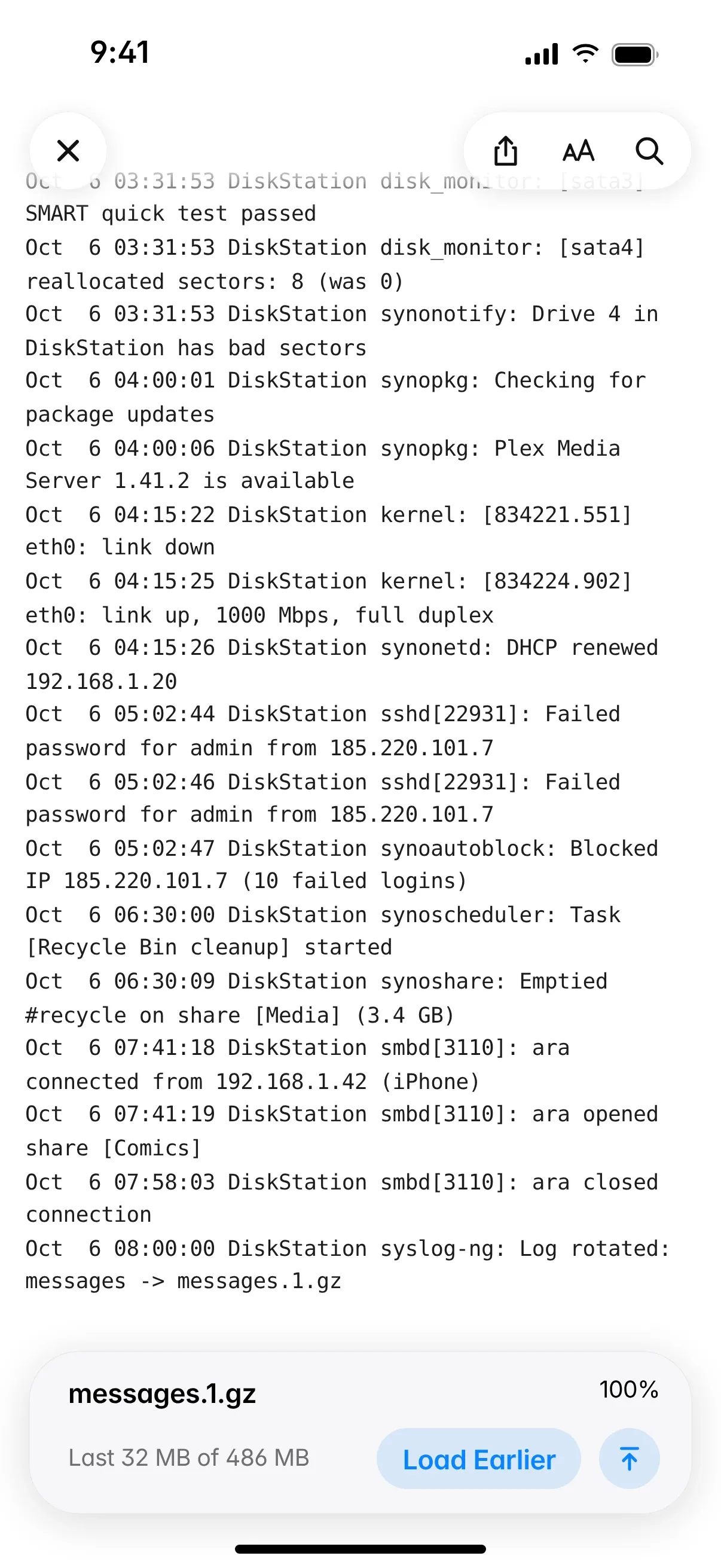
<p>Tap a single <code>.gz</code>, <code>.bz2</code>, <code>.xz</code>, <code>.zst</code> or <code>.lz4</code> and it opens in the viewer for whatever is inside, decoded as it’s read. That rotated <code>messages.1.gz</code> or <code>.log.gz</code> opens straight in the text reader instead of Quick Look, no unzipping on a computer first.</p>
<p><img alt="07-log-gz" loading="lazy" decoding="async" width="1206" height="2622" src="https://naswildcard.com/_astro/979-07-log-gz.D2lSZ-CT_Z1Jji6X.webp"></p>
<h2 id="your-files-stay-yours">Your files stay yours</h2>
<ul>
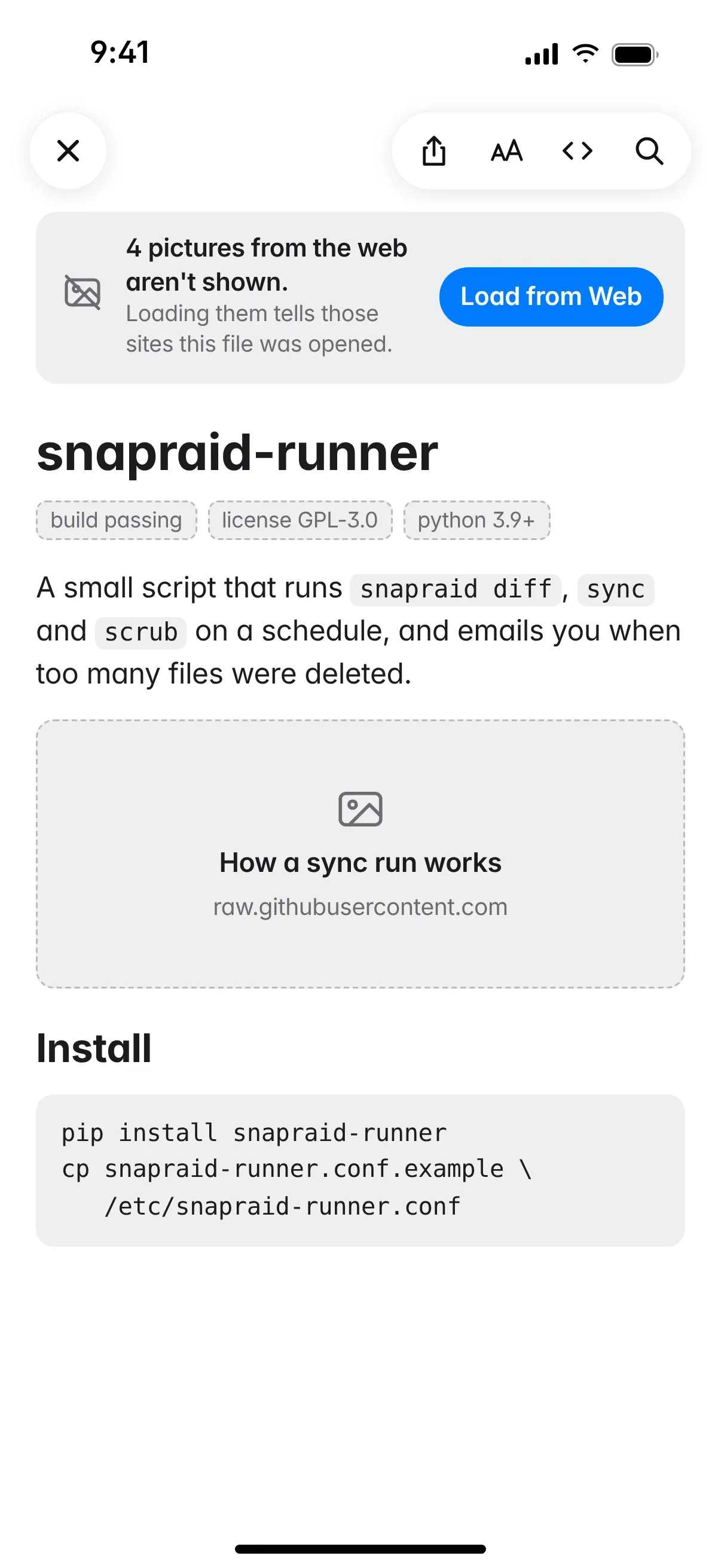
<li>A Markdown or AsciiDoc README no longer fetches pictures from the web on its own, since that tells someone’s server you opened the file. Badges and banners wait as placeholders until you tap Load from Web.</li>
<li>The Markdown reader never runs scripts from files on your NAS.</li>
<li>The Face ID lock on the Files app can’t be skipped by setting the clock back.</li>
<li>Share link passwords are sent to DSM the safe way, and a crafted disk image or zip can no longer crash the app.</li>
</ul>
<p><img alt="08-readme-web-pictures" loading="lazy" decoding="async" width="1206" height="2622" src="https://naswildcard.com/_astro/980-08-readme-web-pictures.BhIK6J0c_Z23Dtdu.webp"></p>
<h2 id="browsing">Browsing</h2>
<ul>
<li>Opening a file keeps the list as it was, with a spinner on the row you tapped, instead of greying everything out.</li>
<li>A <code>.cbr</code> that’s really a zip now shows its cover as a thumbnail, the same page the reader opens on.</li>
<li>Whole-NAS search on DSM returns results instead of an error.</li>
</ul>
<h2 id="accessibility">Accessibility</h2>
<p>At the largest text sizes, long file names and their size and date wrap instead of shrinking to a few letters, and the photo info panel puts each label above its value.</p>
<h2 id="fixes">Fixes</h2>
<ul>
<li>Dragging the scrubber while the reader’s controls fade no longer crashes the app.</li>
<li>A VLC video coming back from Picture in Picture lands square, without rounded corners lingering and popping away.</li>
<li>VLC’s “couldn’t play this file” error shows in German, French and Traditional Chinese.</li>
</ul>
]]></content>
</entry>
<entry>
<title>Build 13: share links, a download queue, and archives from 1994</title>
<id>https://naswildcard.com/updates/2026-10-05-build-13-share-links-a-download-queue-and-archives-from-1994/</id>
<link href="https://naswildcard.com/updates/2026-10-05-build-13-share-links-a-download-queue-and-archives-from-1994/"/>
<updated>2026-10-05T00:00:00.000Z</updated>
<category term="Fix"/>
<category term="New formats"/>
<category term="Reading"/>
<category term="Sharing &amp; offline"/>
<content type="html"><![CDATA[<h2 id="share-links-synology">Share links (Synology)</h2>
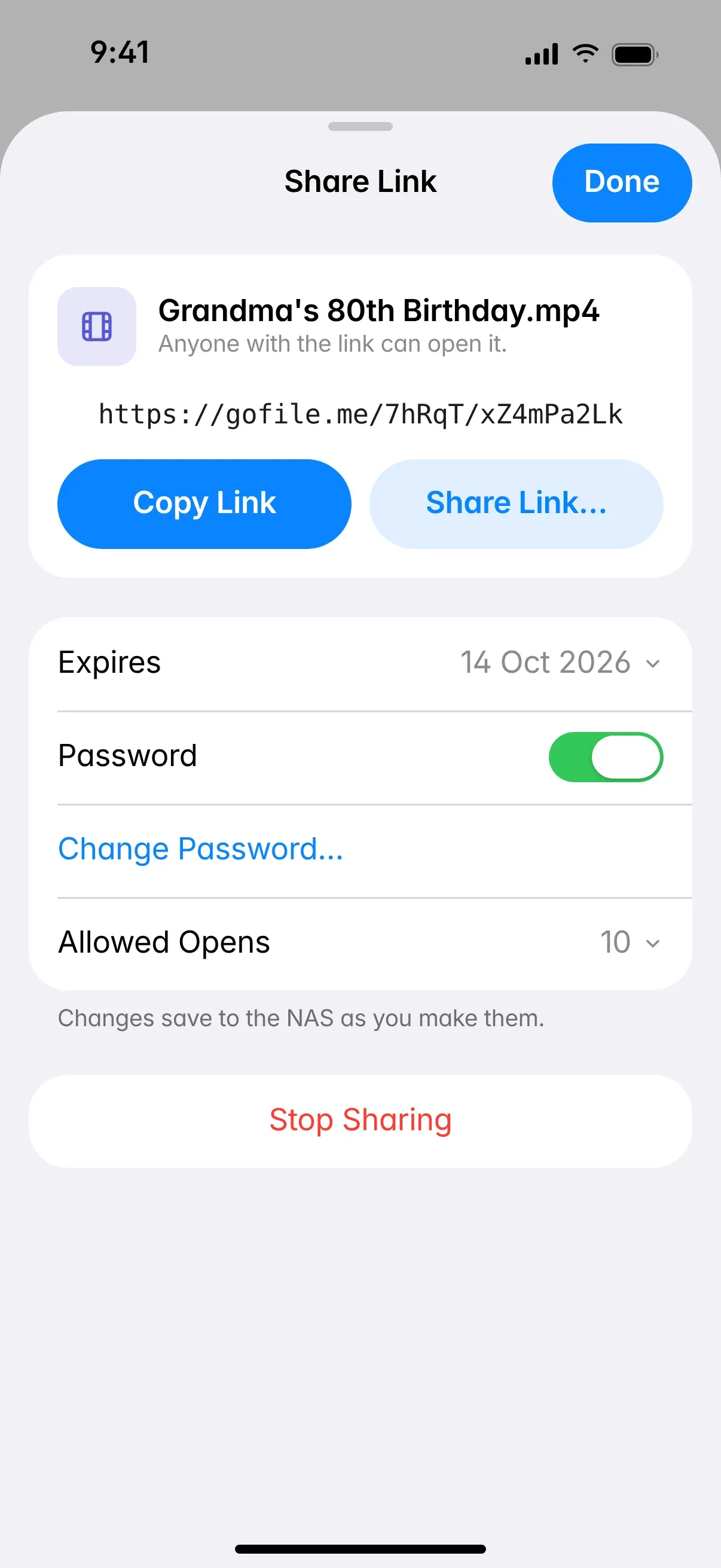
<p>Share Link… makes a DSM share link for a file or folder, right under Share… in the menu. You can set when it expires, add a password and limit how many times it opens, and changes save to the NAS as you make them. Get Info shows whether a file is shared, and a Shared Links list above your shares lets you review links and stop sharing them. If a link would only work on your home network, the app says so.</p>
<p><img alt="04-share-link" loading="lazy" decoding="async" width="1206" height="2622" src="https://naswildcard.com/_astro/976-04-share-link.D5s_yqQL_Z1QvHHH.webp"></p>
<h2 id="a-real-download-queue">A real download queue</h2>
<p>Offline now opens with a Downloading list. A folder is one entry, and you can pause, resume, cancel, retry, reorder, or tap Download Next to move one up. Downloads keep going in the background, and the tab shows a badge while they run. Folders you download stay folders, and Offline and Favorites both have Select for doing several at once.</p>
<p><img alt="a05-download-queue" loading="lazy" decoding="async" width="603" height="1311" src="https://naswildcard.com/_astro/977-a05-download-queue.DPmrqEi9_1Xl6Ks.webp"></p>
<h2 id="more-archives">More archives</h2>
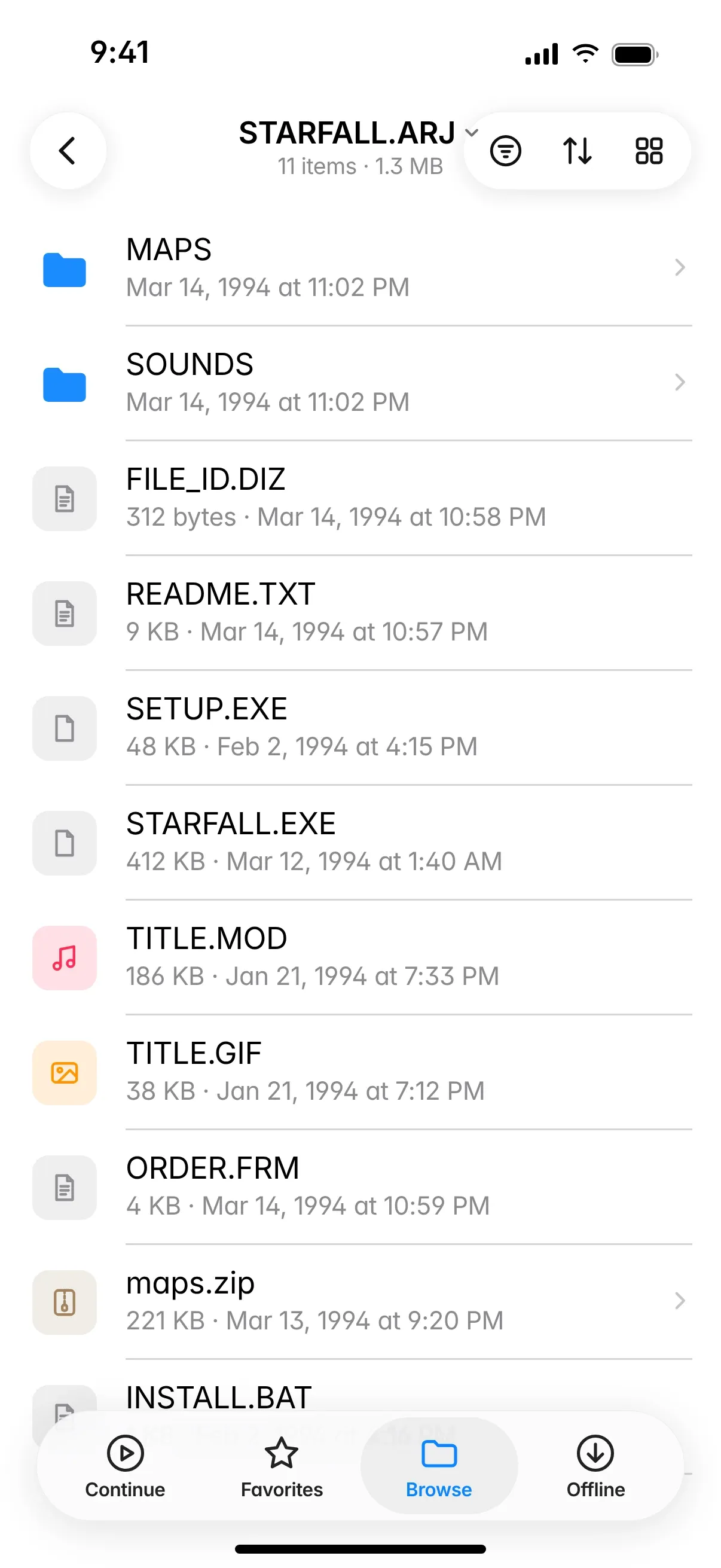
<p>ARJ, ARC and ZOO archives now open as folders, through readers written for this app and tested against 529 real archives from archive.org. So do LHA, Cabinet, XAR and .pkg, cpio, .deb, RPM, and tarballs compressed with zstd, lz4, gzip, bzip2 or xz.</p>
<p><img alt="06-arj-archive" loading="lazy" decoding="async" width="1206" height="2622" src="https://naswildcard.com/_astro/978-06-arj-archive.D7XbsMOb_Z21v8tM.webp"></p>
<h2 id="reading">Reading</h2>
<ul>
<li>A folder or zip of numbered images can be read as a comic. A tip suggests it, and it gets a place in Continue.</li>
<li>Big text files open through a 32 MB window, with Jump to Start and Jump to End, and log files open at the end.</li>
<li>Files without a known extension open in the text reader when they turn out to be text.</li>
<li>A flick of a webtoon strip glides to a stop instead of stopping dead.</li>
</ul>
<h2 id="fixes">Fixes</h2>
<ul>
<li>The audio player keeps the last track’s title and cover until the next one’s are ready, so the cover no longer jumps between tracks.</li>
<li>Coming back from Picture in Picture skips Face ID and goes straight to the player.</li>
<li>The Files app follows the app’s Face ID lock instead of hiding your NAS.</li>
</ul>
]]></content>
</entry>
<entry>
<title>Build 12: tabs, and your NAS in the Files app</title>
<id>https://naswildcard.com/updates/2026-10-04-build-12-tabs-and-your-nas-in-the-files-app/</id>
<link href="https://naswildcard.com/updates/2026-10-04-build-12-tabs-and-your-nas-in-the-files-app/"/>
<updated>2026-10-04T00:00:00.000Z</updated>
<category term="Fix"/>
<category term="Sharing &amp; offline"/>
<content type="html"><![CDATA[<h2 id="your-nas-in-the-files-app">Your NAS in the Files app</h2>
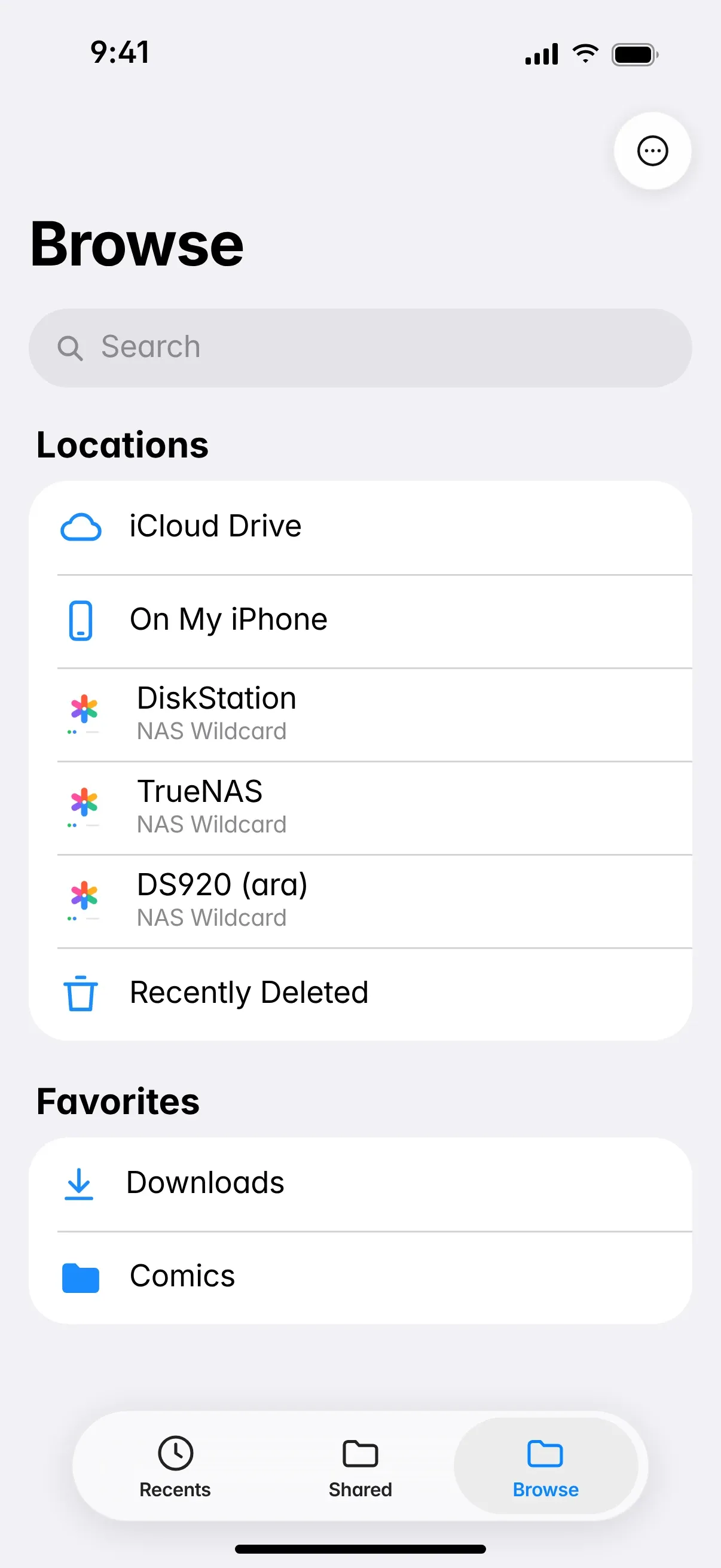
<p>Saved servers now show up in Apple’s Files app under Locations. You can open files from your NAS in any app that uses the Files picker, and archives and disk images show up there as folders.</p>
<p><img alt="03-files-app" loading="lazy" decoding="async" width="1206" height="2622" src="https://naswildcard.com/_astro/975-03-files-app.BxqNgLgR_Z2cJPNc.webp"></p>
<h2 id="tabs">Tabs</h2>
<p>Continue, Favorites, Browse and Offline now each have their own tab, so your shares stay at the top of Browse instead of under a pile of recent files.</p>
<h2 id="smaller-changes">Smaller changes</h2>
<ul>
<li>Face ID now locks the whole app instead of each server, so there’s one lock to set up.</li>
<li>A folder’s download ring shows the progress of the whole folder.</li>
<li>Next and Previous in a file opened from search results go through the results, not the folder it’s in.</li>
<li>A playlist that starts with a video plays on through its music and videos.</li>
<li>Long paths in Get Info wrap after slashes instead of getting cut off.</li>
<li>The player stays black while Picture in Picture hands the video back, with no white flash.</li>
</ul>
]]></content>
</entry>
<entry>
<title>Build 11: a better comic reader</title>
<id>https://naswildcard.com/updates/2026-10-03-build-11-a-better-comic-reader/</id>
<link href="https://naswildcard.com/updates/2026-10-03-build-11-a-better-comic-reader/"/>
<updated>2026-10-03T00:00:00.000Z</updated>
<category term="Fix"/>
<category term="Reading"/>
<category term="Video"/>
<content type="html"><![CDATA[<p>Most of this build went into the comic reader, plus a batch of fixes from the first round of beta testing.</p>
<h2 id="comics">Comics</h2>
<ul>
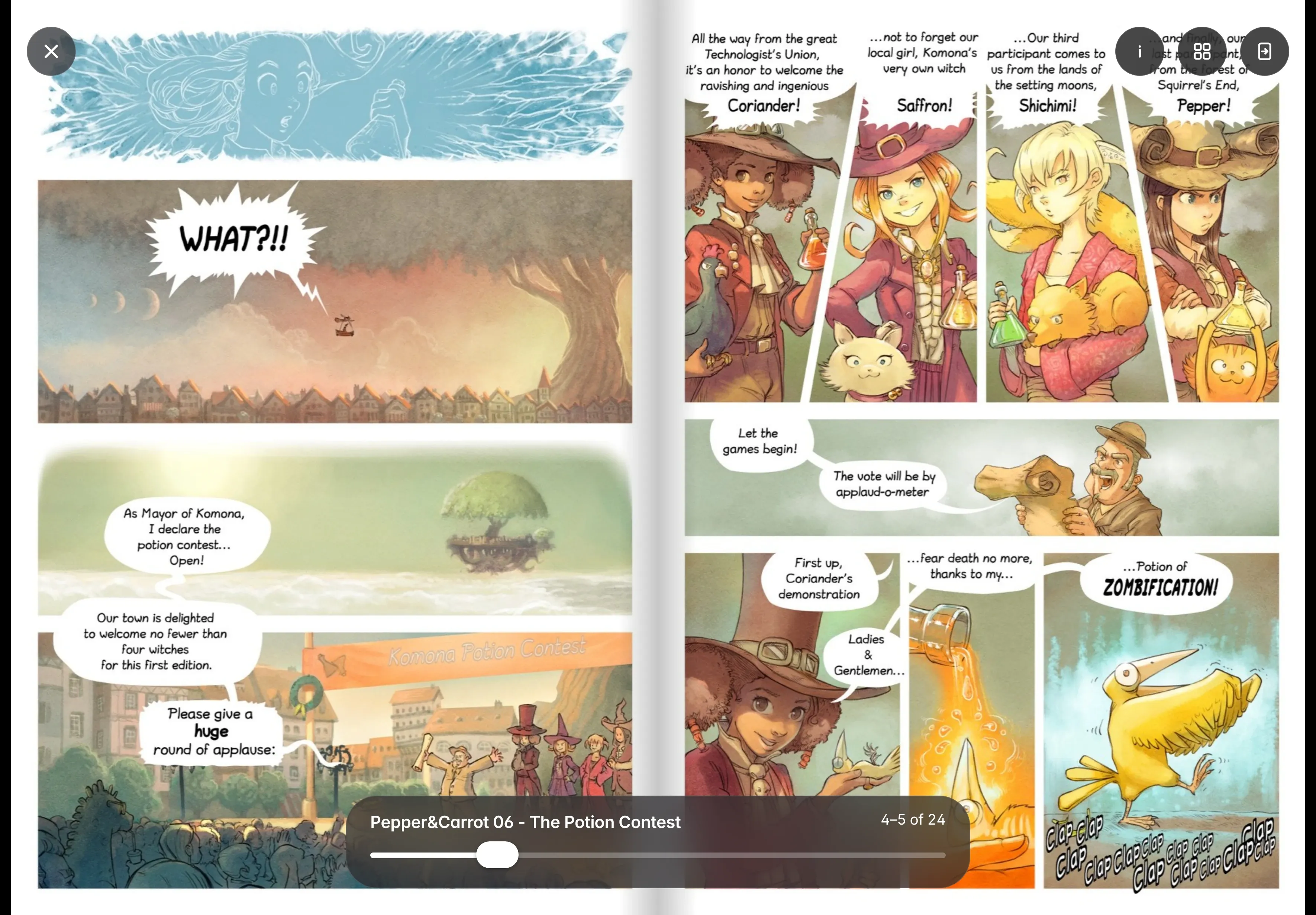
<li><strong>Two-page spreads.</strong> Turn an iPad (or a big iPhone) sideways and pages show in pairs, like a printed book. The cover stays on its own, and a wide page that’s already a spread isn’t split.</li>
<li><strong>Vertical scrolling for webtoons.</strong> Pick Vertical as the reading direction and the whole comic becomes one long strip.</li>
<li><strong>Page grid.</strong> Tap the grid button to see every page at once and jump straight to one.</li>
<li>The page slider no longer buzzes with haptic ticks while you drag it.</li>
</ul>
<p><img alt="01-two-page-spreads" loading="lazy" decoding="async" width="3540" height="2460" src="https://naswildcard.com/_astro/973-01-two-page-spreads.Ds8yRvJl_1KWKYH.webp"></p>
<p><img alt="02-page-grid" loading="lazy" decoding="async" width="1206" height="2622" src="https://naswildcard.com/_astro/974-02-page-grid.J9QLZu3F_1FI5b3.webp"></p>
<h2 id="video-and-audio">Video and audio</h2>
<ul>
<li>Picture in Picture starts when you leave the app during a video, and coming back from it keeps playing.</li>
<li>You can scrub by dragging anywhere on the bar, not just the thumb.</li>
<li>Next and Previous now move between cue-sheet chapters.</li>
<li>The subtitle menu’s On option works on the first tap.</li>
</ul>
<h2 id="photos">Photos</h2>
<ul>
<li>Slideshows have a duration menu, keep playing when you tap the screen, and have a Play/Pause button.</li>
<li>The photo info popover fits its rows and no longer has a light rim in dark mode.</li>
</ul>
<h2 id="fixes">Fixes</h2>
<ul>
<li>Get Info adds up folder sizes on Synology again, instead of failing with error 599.</li>
<li>A large folder you make available offline keeps going after you leave its screen, and shows that it’s still being listed.</li>
<li>A long CSV table no longer stalls on the first swipe.</li>
<li>Unlocking with Face ID fades into a file list that’s already laid out.</li>
</ul>
]]></content>
</entry>
</feed>